
Filtering Financial Data
Filtering with filter() and Lambda Functions

Introduction
In finance and accounting, you rarely work with all your data at once. Often, you need to isolate specific transactions:
expenses over a certain threshold,
payments from a particular vendor, or
entries flagged for review
Python's built-in filter() function, paired with lambda expressions, gives you a clean, readable way to do exactly that with no loops required.
What Are filter() and lambda?
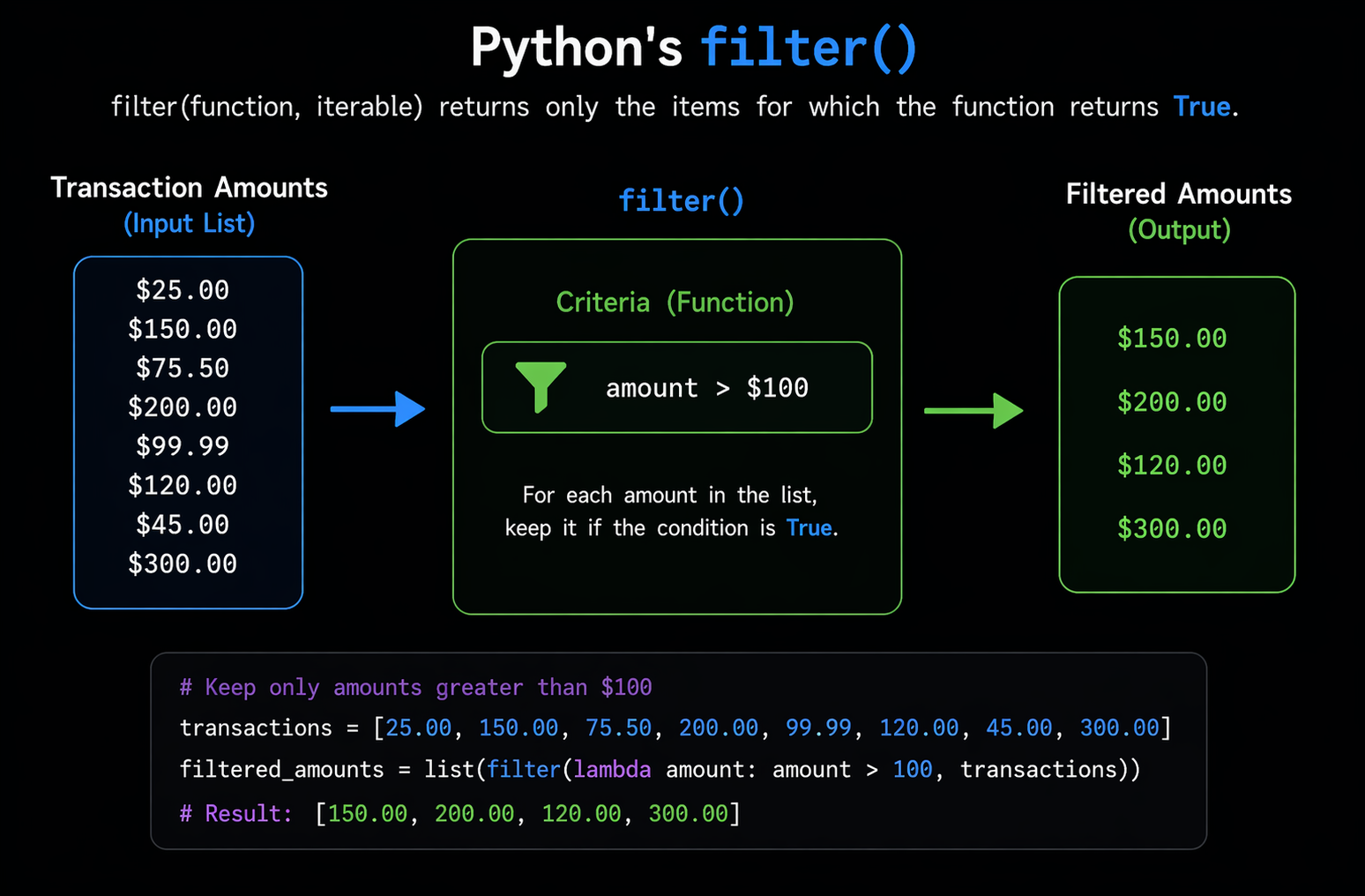
filter(function, iterable) applies a function to each item in a list (or other iterable) and returns only the items where the function evaluates to True.
lambda is a compact, anonymous function defined inline. Instead of writing a full def block for a simple condition, you can write it in one line.
Together, they read almost like plain English:
"Filter this list by [condition]."
Sample Data
Let's start with a realistic list of financial transactions, the kind you might export from accounting software like QuickBooks or a bank feed.
# A list of transactions -- each one is a dictionary representing
# a financial entry (similar to what you'd see in a general ledger)

transactions = [
    {"id": 1,  "description": "Office Supplies",      "amount": -120.50,  "type": "expense", "vendor": "Staples"},
    {"id": 2,  "description": "Client Payment",       "amount":  5000.00, "type": "income",  "vendor": "Acme Corp"},
    {"id": 3,  "description": "Software Subscription","amount": -299.99,  "type": "expense", "vendor": "Adobe"},
    {"id": 4,  "description": "Freelance Invoice",    "amount":  1200.00, "type": "income",  "vendor": "Beta LLC"},
    {"id": 5,  "description": "Team Lunch",           "amount": -85.00,   "type": "expense", "vendor": "Restaurant"},
    {"id": 6,  "description": "Equipment Purchase",   "amount": -1500.00, "type": "expense", "vendor": "Dell"},
    {"id": 7,  "description": "Consulting Fee",       "amount":  3200.00, "type": "income",  "vendor": "Gamma Inc"},
    {"id": 8,  "description": "Utility Bill",         "amount": -210.00,  "type": "expense", "vendor": "City Power"},
]
Example 1: Filter by Transaction Type (Income vs. Expense)
# Filter only income transactions
# lambda receives each transaction (t) and checks if its "type" is "income"

income = list(filter(lambda t: t["type"] == "income", transactions))

print("--- Income Transactions ---")
for t in income:
    print(f"  {t['description']:<25} ${t['amount']:>10,.2f}")
Output
--- Income Transactions ---
  Client Payment            $  5,000.00
  Freelance Invoice         $  1,200.00
  Consulting Fee            $  3,200.00
Finance Tip
Separating inflows from outflows is the first step in a basic cash flow statement, a core document in any business's financial reporting.
Example 2: Filter Large Expenses (Above a
Threshold)
# Filter expenses over $200 -- useful for spotting significant costs
# that may need manager approval or budget review

large_expenses = list(filter(lambda t: t["type"] == "expense" and abs(t["amount"]) > 200, transactions))

print("--- Expenses Over $200 ---")

for t in large_expenses:
    print(f"  {t['description']:<25} ${abs(t['amount']):>10,.2f}  | Vendor: {t['vendor']}")
Output
--- Expenses Over $200 ---
  Software Subscription     $    299.99  | Vendor: Adobe
  Equipment Purchase        $ 1,500.00   | Vendor: Dell
  Utility Bill              $    210.00  | Vendor: City Power
Free Enterprise Tip
Many businesses set an internal capitalization threshold, typically $500 or $2,500, above which a purchase is recorded as a fixed asset rather than an immediate expense. You could swap
200for your threshold to automate that categorization.
Example 3: Filter by Vendor
# Useful for vendor audits, account reconciliation,
# or pulling all transactions tied to a specific supplier or client

vendor_name = "Acme Corp"

vendor_transactions = list(filter(lambda t: t["vendor"] == vendor_name, transactions))

print(f"--- Transactions with {vendor_name} ---")
for t in vendor_transactions:
    print(f"  {t['description']:<25} ${t['amount']:>10,.2f}")
Output
--- Transactions with Acme Corp ---
  Client Payment            $  5,000.00
Accounting Tip
Filtering by vendor is the foundation of a vendor ledger, a sub-ledger that tracks all activity with individual suppliers or clients. This is critical during audits and for Accounts Payable / Receivable management.
Example 4: Chaining Multiple Conditions
# Filter for income transactions above $2,000
# Useful for identifying your highest-value clients or revenue streams

high_value_income = list(filter(lambda t: t["type"] == "income" and t["amount"] > 2000, transactions))

print("--- High-Value Income (Over $2,000) ---")
for t in high_value_income:
    print(f"  {t['description']:<25} ${t['amount']:>10,.2f}  | Client: {t['vendor']}")
Output
--- High-Value Income (Over $2,000) ---
  Client Payment            $  5,000.00  | Client: Acme Corp
  Consulting Fee            $  3,200.00  | Client: Gamma Inc
Business Insight
This kind of filter maps directly to an 80/20 analysis (Pareto Principle). In most businesses, a small number of clients generate the majority of revenue. Identifying your top earners quickly is a real competitive advantage.
Putting It All Together: A Reusable Filter Function
Rather than rewriting filter() + lambda every time, you can wrap the pattern in a reusable utility:
implementing in a more Pythonic way
defining a reusable function
using keyword arguments packing (
**kwargs)list comprehensions
clearer structure
def filter_transactions(transactions, **criteria):
    """
    Filter a list of transactions by any combination of field conditions.

    Each keyword argument represents a field and the value it must match.
    Example:
        filter_transactions(transactions, type="expense")
        filter_transactions(transactions, vendor="Dell")
    """

    # Build a new list by keeping only transactions that match *all* criteria
    return [
        t for t in transactions
        # all(...) ensures every condition is satisfied for this transaction
        # Use dict.get() to safely access fields (avoids KeyError if missing)
        if all(t.get(field) == value for field, value in criteria.items())
    ]

# A list of transactions -- each one is a dictionary representing
# a financial entry (similar to what you'd see in a general ledger)

transactions = [
    {"id": 1,  "description": "Office Supplies",      "amount": -120.50,  "type": "expense", "vendor": "Staples"},
    {"id": 2,  "description": "Client Payment",       "amount":  5000.00, "type": "income",  "vendor": "Acme Corp"},
    {"id": 3,  "description": "Software Subscription","amount": -299.99,  "type": "expense", "vendor": "Adobe"},
    {"id": 4,  "description": "Freelance Invoice",    "amount":  1200.00, "type": "income",  "vendor": "Beta LLC"},
    {"id": 5,  "description": "Team Lunch",           "amount": -85.00,   "type": "expense", "vendor": "Restaurant"},
    {"id": 6,  "description": "Equipment Purchase",   "amount": -1500.00, "type": "expense", "vendor": "Dell"},
    {"id": 7,  "description": "Consulting Fee",       "amount":  3200.00, "type": "income",  "vendor": "Gamma Inc"},
    {"id": 8,  "description": "Utility Bill",         "amount": -210.00,  "type": "expense", "vendor": "City Power"},
]


def main(transactions):
    # --- Example calls ---

    # Get all transactions where type == "expense"
    expenses = filter_transactions(transactions, type="expense")

    # Get all transactions where type == "income" AND vendor == "Acme Corp"
    acme_income = filter_transactions(transactions, type="income", vendor="Acme Corp")

    print("--- All Expenses ---")
    for t in expenses:
        # Print description (left-aligned, width 25) and amount (right-aligned, 2 decimals)
        print(f"  {t['description']:<25} ${t['amount']:>10,.2f}")

    print("\n--- Acme Corp Income ---")
    for t in acme_income:
        # Same formatted output for filtered income transactions
        print(f"  {t['description']:<25} ${t['amount']:>10,.2f}")


if __name__ == "__main__":
    main(transactions)
Output
--- All Expenses ---
  Office Supplies           $   -120.50
  Software Subscription     $   -299.99
  Team Lunch                $    -85.00
  Equipment Purchase        $ -1,500.00
  Utility Bill              $   -210.00

--- Acme Corp Income ---
  Client Payment            $  5,000.00
Things to note
filter()helps you write clean, readable code without needing to create loops for simple conditions.lambdafunctions are great for quick, one-time conditions you don’t need to reuse.If your logic is more detailed or something you’ll use again, it’s better to define a regular function with
def.Financial data works especially well with
filter()because you often need to narrow things down—by type, amount, date, vendor, or status.These same ideas also work smoothly with pandas DataFrames as your data becomes larger and more complex.