

In my previous post, Getting Started with Azure Functions, we created an HTTP-triggered function that accepts a name and returns a greeting.
We ended with a working endpoint. We can now make improvements to its behavior so it returns something useful when an application calls it.
Improving the function
With the same greeting example, we can improve how the function handles requests:
- Read a name from the query string or a JSON request body.
- Check that the input has the shape and type we expect.
- Return an error when required input is missing.
- Use JSON for both successful responses and errors.
Without getting too complicated, let's establish some habits we can carry into endpoints that handle business data.
Start with the HTTP request
Our function is available locally at this endpoint: http://localhost:7071/api/hello.
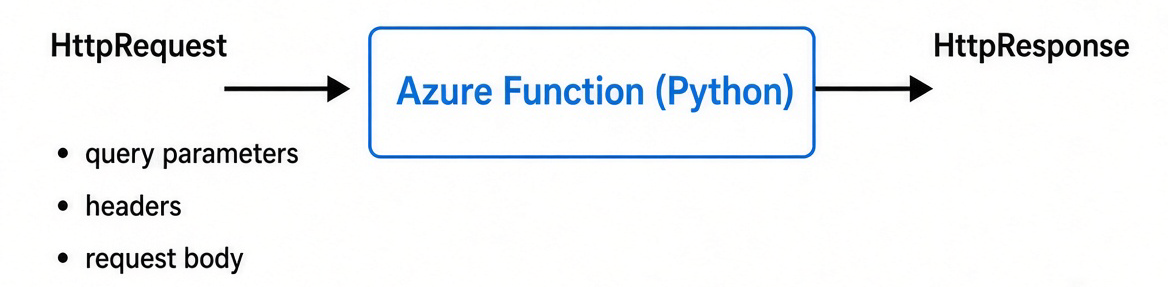
An HTTP-triggered Python function receives an HttpRequest object. That object gives us access to the query parameters, headers, and request body. We return an HttpResponse to control what the caller receives.
For the greeting endpoint, the simplest request puts the name in the URL:
http://localhost:7071/api/hello?name=John
Inside the function, we read that value with:
name = req.params.get("name")
The params mapping contains the request’s query parameters. In this case, we’re looking for the parameter named name.
Our original function used it to return:
Hello, John. Nice to meet you.
That works well for a first example.
Before we add more code, let's set up some rules. We can decide what requests our endpoint should accept.
Define the endpoint’s behavior
For this version, we’ll use the following rules:
| Request | Behavior |
|---|---|
A query string contains name |
Use the query-string value. |
A POST request has no name query parameter |
Read name from a JSON body. |
Both locations contain name |
Use the query-string value. |
| The selected name is missing, blank, or not a string | Return 400 Bad Request. |
| The selected name is valid | Return 200 OK with a JSON greeting. |
The precedence rule matters. Without one, a request containing two different names leaves us guessing which value the function will use.
We can also distinguish between a missing query parameter and an empty one:
/api/hello
/api/hello?name=
- In the first request, there is no query-string value, so a POST request can fall back to its body.
- In the second, the caller explicitly supplied an empty name. We’ll validate that value and reject it rather than silently looking somewhere else.
These are choices for this endpoint, not rules Azure Functions imposes on every API.
Accept a JSON request body
Instead of putting the name in the URL, a caller can send it in a POST request:
{
  "name": "John"
}
Here’s the request using curl:
Bash/Linux:
curl -i "http://localhost:7071/api/hello" \
  -H "Content-Type: application/json" \
  -d '{"name": "John"}'
The -d option sends the body and makes this a POST request. The -i option includes response headers, which lets us inspect the HTTP status as well as the response body.
PowerShell:
$body = '{"name": "John"}'

$body | curl.exe -i "http://localhost:7071/api/hello" `
  -H "Content-Type: application/json" `
  --data-binary '@-'
The PowerShell examples call curl.exe explicitly and pipe the JSON body into it. We’ll use this same pattern throughout the article.
In our function, we parse the body with:
body = req.get_json()
Azure Functions exposes get_json() on the request object to read JSON-encoded input. Its return type is Any, so we should not assume the parsed result is always a dictionary.
This return type distinction is important.
All of these are valid JSON:
{"name": "John"}
["John", "Jane"]
"John"
Only the first one matches the object structure our endpoint expects.
Parsing JSON
Parsing tells us whether the JSON document is syntactically valid and can be successfully read.
Validating JSON
Validation tells us whether the parsed document has the expected structure and contains input our endpoint accepts.
Return JSON consistently
Let’s also change the successful response from plain text to JSON:
{
  "message": "Hello, John. Nice to meet you."
}
For invalid input, we’ll return an error object:
{
  "error": "The 'name' value must not be empty."
}
This gives callers a helpful and predictable response format. They can inspect the HTTP status, parse the JSON, and read either message or error.
To build those responses, we’ll serialize a Python dictionary with json.dumps() and set the response MIME type to application/json. Azure Functions lets us customize the response body, status, and headers through HttpResponse.
Put the complete function together
The following example uses the Python v2 programming model. The route decorator defines the endpoint and restricts it to GET and POST requests. Azure Functions supports specifying allowed HTTP methods on the route.
More about the Python v2 programming model
In our existing function_app.py, replace the greeting implementation with this version. Make sure you only keep one FunctionApp instance in the file.
import json

import azure.functions as func


# Create the Azure Functions application.
#
# http_auth_level controls whether callers must provide an Azure Functions
# access key when calling HTTP-triggered functions in this application.
#
# ANONYMOUS is convenient for local development and learning because the
# endpoint can be called without a function key.
#
# IMPORTANT:
# Authentication and authorization requirements should be reviewed before
# exposing an HTTP endpoint in a production environment.
app = func.FunctionApp(http_auth_level=func.AuthLevel.ANONYMOUS)


def json_response(
    payload: dict[str, str],
    status_code: int = 200,
) -> func.HttpResponse:
    """
    Create a consistent JSON HTTP response.

    Keeping response creation in one helper function avoids repeating
    json.dumps(), MIME type configuration, and status-code handling
    throughout the HTTP-triggered function.

    Args:
        payload:
            Dictionary that will be serialized into JSON and returned
            to the caller.

        status_code:
            HTTP status code to return. Defaults to 200 (OK).

    Returns:
        An Azure Functions HttpResponse containing JSON.
    """
    return func.HttpResponse(
        # HttpResponse expects the response body as a string or bytes,
        # so convert the Python dictionary into a JSON string.
        body=json.dumps(payload),

        # Common status codes used by this function:
        # 200 = Request succeeded
        # 400 = Client supplied an invalid request
        status_code=status_code,

        # Tell the client that the response body contains JSON.
        mimetype="application/json",
    )


# Register this function as an HTTP-triggered Azure Function.
#
# The route creates an endpoint ending in:
#
#   /api/hello
#
# Only GET and POST requests are accepted.
@app.route(route="hello", methods=["GET", "POST"])
def hello(req: func.HttpRequest) -> func.HttpResponse:
    """
    Return a greeting after validating a supplied name.

    Supported input examples:

        GET /api/hello?name=Alex

    or a POST request containing JSON:

        {"name": "Alex Taylor"}

    If both a query-string value and JSON body are supplied, the
    query-string value takes precedence.

    Args:
        req:
            The incoming HTTP request supplied by the Azure Functions
            Python runtime.

    Returns:
        200 with a greeting when the name is valid.

        400 when the request is missing a name or contains invalid input.
    """

    # ---------------------------------------------------------------
    # 1. Check the query string
    # ---------------------------------------------------------------

    # Query-string parameters are available through req.params.
    #
    # Example request:
    #
    #   GET /api/hello?name=Alex
    #
    # In this example:
    #
    #   req.params.get("name")
    #
    # returns:
    #
    #   "Alex"
    #
    # We intentionally check for None later rather than simply checking
    # whether name is truthy. This allows empty strings to continue to
    # the validation logic where they can receive a more specific error.
    name = req.params.get("name")


    # ---------------------------------------------------------------
    # 2. Check the POST request body when necessary
    # ---------------------------------------------------------------

    # Only inspect the request body when:
    #
    #   1. No name was supplied in the query string.
    #   2. The HTTP method is POST.
    #
    # This establishes a clear input-precedence rule:
    #
    #   Query string -> JSON body
    #
    # If a name exists in both locations, the query-string value wins.
    if name is None and req.method == "POST":

        # Check whether the request body is empty before trying to
        # parse it as JSON.
        #
        # An empty body and malformed JSON represent different problems,
        # so handling them separately allows the API to return clearer
        # error messages to the caller.
        if not req.get_body():
            return json_response(
                {
                    "error": (
                        "Provide 'name' in the query string "
                        "or in a JSON request body."
                    )
                },
                status_code=400,
            )


        # -----------------------------------------------------------
        # 3. Parse the JSON request body
        # -----------------------------------------------------------

        # get_json() converts JSON from the HTTP request into its
        # corresponding Python value.
        #
        # For example, the JSON:
        #
        #   {"name": "Alex Taylor"}
        #
        # becomes a Python dictionary.
        #
        # Malformed JSON causes get_json() to raise ValueError, so JSON
        # parsing is placed inside a try/except block.
        try:
            body = req.get_json()

        except ValueError:
            # HTTP 400 (Bad Request) is returned because the client
            # supplied a request body that could not be parsed as JSON.
            return json_response(
                {"error": "The request body must contain valid JSON."},
                status_code=400,
            )


        # -----------------------------------------------------------
        # 4. Validate the JSON structure
        # -----------------------------------------------------------

        # Successfully parsing JSON does NOT guarantee that we received
        # a JSON object.
        #
        # For example, all of the following are valid JSON:
        #
        #   ["Alex"]
        #   "Alex"
        #   100
        #   true
        #   null
        #
        # This endpoint specifically expects an object:
        #
        #   {"name": "Alex Taylor"}
        #
        # In Python, a JSON object is represented as a dictionary.
        #
        # Performing this validation also ensures that calling
        # body.get("name") below is safe.
        if not isinstance(body, dict):
            return json_response(
                {"error": "The JSON request body must be an object."},
                status_code=400,
            )


        # Retrieve the name from the JSON object.
        #
        # dict.get() returns None when the key does not exist.
        #
        # This means both of the following requests will eventually
        # reach the missing-name validation below:
        #
        #   {}
        #
        #   {"name": null}
        name = body.get("name")


    # ---------------------------------------------------------------
    # 5. Validate that a name was supplied
    # ---------------------------------------------------------------

    # At this point, None means that neither supported input location
    # produced a name.
    #
    # For GET:
    #   No name was supplied in the query string.
    #
    # For POST:
    #   No name was supplied in the query string or JSON body.
    if name is None:
        return json_response(
            {
                "error": (
                    "Provide 'name' in the query string "
                    "or in a JSON request body."
                )
            },
            status_code=400,
        )


    # ---------------------------------------------------------------
    # 6. Validate the data type
    # ---------------------------------------------------------------

    # Never assume that a JSON property contains the expected data type.
    #
    # For example, this is valid JSON:
    #
    #   {"name": 123}
    #
    # but it is not valid input for this endpoint because "name" is
    # expected to contain text.
    #
    # Performing the type check before calling .strip() also prevents
    # runtime errors such as:
    #
    #   AttributeError: 'int' object has no attribute 'strip'
    if not isinstance(name, str):
        return json_response(
            {"error": "The 'name' value must be a string."},
            status_code=400,
        )


    # ---------------------------------------------------------------
    # 7. Normalize the input
    # ---------------------------------------------------------------

    # Remove leading and trailing whitespace from the supplied name.
    #
    # Example:
    #
    #   "   Alex Taylor   "
    #
    # becomes:
    #
    #   "Alex Taylor"
    #
    # Normalizing input before using it helps keep API behavior
    # predictable and prevents accidental whitespace from becoming
    # part of the application's data.
    name = name.strip()


    # ---------------------------------------------------------------
    # 8. Reject an empty name
    # ---------------------------------------------------------------

    # A value containing only whitespace becomes an empty string
    # after strip().
    #
    # Examples rejected here include:
    #
    #   ?name=
    #
    #   {"name": ""}
    #
    #   {"name": "   "}
    if not name:
        return json_response(
            {"error": "The 'name' value must not be empty."},
            status_code=400,
        )


    # ---------------------------------------------------------------
    # 9. Return the successful response
    # ---------------------------------------------------------------

    # No explicit status_code is necessary here because json_response()
    # defaults to HTTP 200 (OK).
    #
    # Example response:
    #
    #   {
    #       "message": "Hello, Alex Taylor. Nice to meet you."
    #   }
    return json_response(
        {"message": f"Hello, {name}. Nice to meet you."}
    )
The function is longer than our original example, but each check serves a purpose:
- Parsing: Can we parse the body?
- Validation: Is the body a JSON object, and is the name a string?
- Normalization: Does the name contain non-whitespace content?
- Response generation: Where do we read the name? How do we respond?
Engineering Best Practices
It's also important to notice that we don’t wrap the entire function in a broad except Exception block.
Instead, we handle parsing errors where they can occur and use explicit checks for expected input problems. This makes the code easier to understand, debug, and maintain.
We also respect the query string's precedence: if a name is provided as a query parameter, we skip parsing and validating the body entirely. This avoids unnecessary work and keeps the control flow predictable.
This is a fundamental software engineering decision that goes beyond a stylistic choice.
We are using software engineering best practices:
- Handle errors at the right level
- Make assumptions explicit
- Keep the code focused on the work it actually needs to do
Try successful and unsuccessful requests
Start the application with the local command from the previous post:
Bash/PowerShell:
func start
We can leave the function running and open another terminal to send the a few requests.
Read the name from the query string
Bash:
curl -i "http://localhost:7071/api/hello?name=John"
PowerShell:
curl.exe -i "http://localhost:7071/api/hello?name=John"
The expected status is: 200 OK.
{
  "message": "Hello, John. Nice to meet you."
}
Read the name from a JSON body
Bash:
curl -i "http://localhost:7071/api/hello" \
  -H "Content-Type: application/json" \
  -d '{"name": "John"}'
PowerShell:
$body = '{"name": "John"}'

$body | curl.exe -i "http://localhost:7071/api/hello" `
  -H "Content-Type: application/json" `
  --data-binary '@-'
Expected status: 200 OK, with the same greeting.
{
  "message": "Hello, John. Nice to meet you."
}
Leave out the name
Bash:
curl -i "http://localhost:7071/api/hello"
PowerShell:
curl.exe -i "http://localhost:7071/api/hello"
Expected status: 400 Bad Request.
{
  "error": "Provide 'name' in the query string or in a JSON request body."
}
Send the wrong data type
Bash:
curl -i "http://localhost:7071/api/hello" \
  -H "Content-Type: application/json" \
  -d '{"name": 123}'
PowerShell:
$body = '{"name": 123}'

$body | curl.exe -i "http://localhost:7071/api/hello" `
  -H "Content-Type: application/json" `
  --data-binary '@-'
Expected status: 400 Bad Request.
{
  "error": "The 'name' value must be a string."
}
Send a name containing only spaces
Bash:
curl -i "http://localhost:7071/api/hello" \
  -H "Content-Type: application/json" \
  -d '{"name": "   "}'
PowerShell:
$body = '{"name": "   "}'

$body | curl.exe -i "http://localhost:7071/api/hello" `
  -H "Content-Type: application/json" `
  --data-binary '@-'
Expected status: 400 Bad Request.
{
  "error": "The 'name' value must not be empty."
}
You can also try an array, malformed JSON, or a request containing different names in the query string and body. Each one exercises a different branch of the function.
These small changes matter
The most useful improvement here is predictability.
We’ve defined which input takes precedence, which values we accept, and what callers receive when something is wrong.
That makes the endpoint easier to use without requiring the caller to understand its implementation.
It also gives us concrete cases to test. Instead of checking only whether “John” produces a greeting, we can check missing fields, invalid types, blank strings, and parsing failures.
The greeting is still simple. The request-handling decisions are the same kinds of decisions we’ll need when an endpoint accepts a transaction, creates a task, or receives data from another application.
Next Steps
We've taken a basic Azure Function and explored a few ways to improve it. The function now has an endpoint with a clear input contract and consistent responses.
We learned how to:
- Read values from query parameters
- Accept JSON data in the request body
- Return different HTTP status codes
- Think about input validation and error handling
This is still a small example, but these concepts are useful when building more practical HTTP endpoints with Azure Functions.
A natural next step would be to return a JSON response instead of plain text, or to connect the function to another Azure service.
About the author
- • engineer • learning • 🐍⚙️☁️📄
Comments
Join the discussionNo comments yet. Be the first to comment.